DISCUSSION ON A NEW THEME IS ON ITS WAY.ITS MADE AVAILABLE TO PUBLIC PLZ TELL US YOUR COMMENTS ON OUR DISCUSSION PAGE.
LINK TO THE NEW THEME http://alltestlab.blogspot.in/
Showing posts with label More. Show all posts

Aquafadas MotionComposer v1.0.3

 Aquafadas MotionComposer v1.0.3 


With MotionComposer you will be able to run your content everywhere after you create it. All your web content, animations and other interactive content that you have created with MotionComposer can be watched on any operating system and any device. Your content will be watchable on Mac, PC, tablets, iPhone, iPad, smartphones and Android powered devices. This will certainly save allot of time and allow you to dedicate more attention to content creation.
MotionComposer offers unique technology that plays interactive content as Flash in any flash supported web browser. In case that some of the web browsers do not have flash support content will be automatically delivered in HTML5 version. This means that your content that was created with MotionComposer will play in any browser and in any OS.

Google Chrome 14 finally adds full screen support for OS X Lion


Google Chrome 14 finally adds full screen support for OS X Lion

Mac OS X Lion users who have switched from Chrome to Safari in order to benefit from the recently released operating system's features, like full screen mode, can now go back to the Google browser. Its latest update now adds full screen support and the new invisible scroll bars.
Google has also added many of the visual niceties that can be found in Lion to the latest stable release of Chrome, version 14.
Many users deserted the Google browser when Apple launched its latest operating system because it didn’t offer full screen support, or the much-lauded invisible scroll bars.
And, as a bonus, Chrome now also supports two-finger scrolling between web pages.
The update, which is available for free for Windows and Linux users as well, also fixes some of the known issues, including a number of "high-level" bugs.
Because of the way it works, Chrome should automatically update, bringing the new features to your desktop without you having to do much.

 Other Improvements
In this version of Chrome, Google has branched out in a couple of ways. This time around it has included support for new OS X Lion features: Overlay Scrollbars, and Full-screen mode, and the Chrome Web Store has expanded internationally to 24 new countries: Argentina, Austria, Belgium, Brazil, Czech Republic, Denmark, Finland, France, Germany, Hong Kong, India, Israel, Italy, Japan, Mexico, Netherlands, Norway, Poland, Portugal, Russia, Spain, Sweden, Switzerland and the United Kingdom .
                                                             To Download Chrome 14 Click Below

Mozilla Thunderbird 5.0, a look at new features!| PPA Ubuntu


Mozilla released the latest version of thunderbird, Thunderbird 5.0, after 1 and a half year of Thunderbird 3.1. The major release has the version number 5.0 (and not
thunderbird

4.0!) to match the latest Firefox version 5.0 that was released a week back. The open source cross-platform email client and news reader promises to be efficient fast and better! The post reviews the new features of Thunderbird 5.0!

The new Thunderbird comes with a handful of new features such as drag and drop enabled interface, improved add-on manager and account creating wizard and several fixes. The most apparent change you shall notice is definitely the better, minimal and more modern interface. The Add-on manager, Trouble shooting page and many bug fixes!
Improved Speed: Thunderbird would launch in a matter of seconds now! Thunderbird is more stable and more secure owing to over 300 bug fixes. Thunderbird, being based on Mozilla Gecko 5 engine, the second most popular open source browser engine.
Easy to setup account: You can now easily create a new account from:
File->New->Account
2
1

The Troubleshooting page: The troubleshooting page is completely revised to cater more issues that one faces while using Thunderbird!
3
The New Add-on Manager: The Add-on manager is enhanced. It will open in a new Tab. You can extend the capabilities of Thunderbird with the latest available add-ons. The add-on manager will feature “Thunderbird Collection” and “Featured Add-ons” where you can find recommended add-ons for your browser. You will also find the information about some upcoming extensions. With the Add-on manager you can also customize the email client and install themes. There are theme fixes for Windows Vista and Windows 7 clients.
4
The Drag & Drop and few minor changes: You will also be able to drag and drop windows, just like in the browser to make them separate windows. You will also be able to re-order the tab. Now you will also be able to view details of attachment i.e. the size of the attachment, included in the email. Plug-ins can now be loaded with RSS feeds by default.
Installation guide: Before you install the new version of Thunderbird you must delete the old thunderbird file to avois erroes and problems. Incase you do uninstall the old directory and encounter a bug, such a bug wil not be entertained by Mozilla.
Download Thunderbird 5 for Linux,Windows and Mac. 

Installation for Ubuntu and LInuxMint:

Mozilla Thunderbird 5 also available on PPA, you can install / Upgradeto this latest release via the following PPA  :

sudo add-apt-repository ppa:mozillateam/thunderbird-stable sudo apt-get update sudo apt-get install thunderbird


Sketchbook Mobile

SketchBook Mobile

Unleash your creativity with SketchBook Mobile for Android!
Autodesk SketchBook® Mobile is a professional-grade paint and drawing application offering a full set of sketching tools and a streamlined and intuitive user interface.
*Requires a multi-touch device running Android 2.1 or above. Recommended devices include: 1GHz processor, 512mb RAM.

Features


Designed for use with tablet PCs or digitized pen tablets, Autodesk® SketchBook® Pro drawing and painting software is your digital sketchpad. It is easy to use with fast, reactive drawing and productivity-enhancing tools that help you express your ideas freely and boost production. Use it in any design process where pen and paper would traditionally be used, including:
  • Product concept design and ideation
  • Illustrations
  • Character studies
  • Set and level designs
  • Storyboarding
  • Annotation and review
Autodesk Sketchbook Pro: A Natural Sketching Experience
A Natural Sketching ExperienceSketchBook Pro is your virtual sketchbook. Designed specifically for pen-based interaction, SketchBook Pro enables you to transform your desktop computer, laptop, or tablet PC into a digital sketchpad. The intuitive interface makes it easy to access a host of tools and features, including pencils, markers, brushes, colors, guides, layers, and blending effects.
Autodesk SketchBook Pro: Professional-Quality Tools
Professional-Quality ToolsFamiliar brush types and realistic and completely customizable pencils, pens, markers, and airbrushes allow you to quickly and easily produce graphics. The power of drawing straight lines, rectangles, circles, and ellipses with draw modes or snapping-to guides are at your fingertips. Use the newly added Type options to easily add annotations and descriptions.
Autodesk SketchBook Pro: Image Enhancements
Image EnhancementsThe look of your images can be fine-tuned by adjusting the colors, contrast, canvas size, and crop. Full-featured layers, including preserve transparency and blend modes, help you color and create.
Autodesk SketchBook Pro: Any Creative Process


                           What's New


What's in this version:
  1. ✓Bug fix
  2. ✓Support for 4.x (Ice Cream Sandwich)
  3. ✓Stability Improvements
  4. ✓Fixes working on tablet devices  


Any Creative ProcessSketchBook Pro fits in virtually any creative workflow; load and view images and photographs for reference or mark up and annotate. SketchBook Pro lets you open and save images from a variety of image formats, including moving files directly in and out of Adobe® Photoshop® software.


    VLC Direct pro for android

    VLC Direct Pro


    No more file transfers! Stream and play Music and Videos anywhere you want!
    PROMOTIONAL PRICE FOR A LIMITED TIME!
    Do you like to watch videos or listen to music? Then this application is for you.
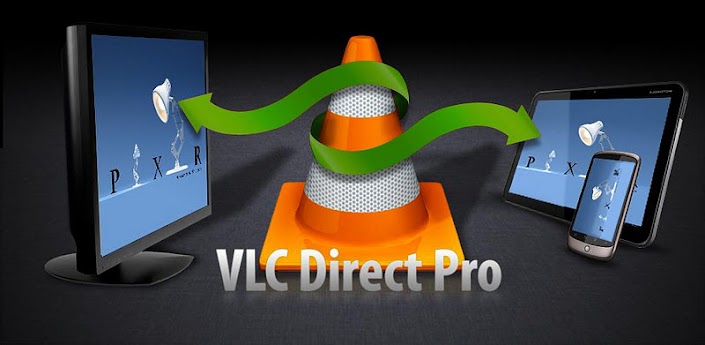
    No more file transfers! One click and you will be streaming videos, music and photos from your computer to your Android and from your Android to your Computer.
                  
    This is the only application of the entire market that can stream videos and music in both ways:
    * From Computer to Android
    * From Android to computer

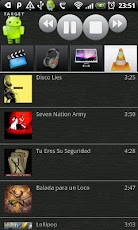
    With this application you can play music and videos in your computer's VLC or in your Android device. You don't have to worry where your files are stored -they can be in your android or in your computer-, VLC Direct Pro will take care of streaming when necessary.

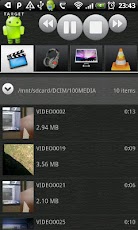
    * VLC remote control features  : browse files, play, enqueue, pause, stop, volume, fullscreen, playlist and more.
    NEW Feature 
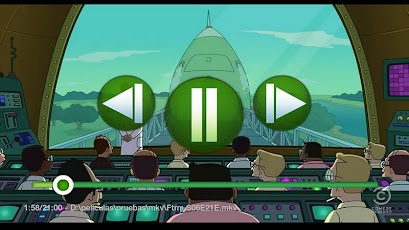
    *SUBTITLES SUPPORT!!! (.srt files)

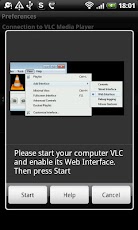
    * SUPER EASY CONFIGURATION -  JUST ONE CLICK AND YOU WILL BE READY TO GO!

    * Only for advanced users : If you want to use VLC Direct Pro through remote networks these are the ports you will have to map in the routers:
    * 8080 (VLC Web Interface)
    * 4444 (Streaming from Android to VLC)
    * 5554 (Streaming from VLC to Android)

    What's in this version:
    Bugfixes
    Performance Improvements
    MP2 Format Support Added
    AC3 Format Support
    Minor UI Improvements


    Plex for androids

    Plex for Android


    Plex in a nutshell is a media platform that runs on Macs, PCs and Linux that is capable of organizing your media so that it can be viewed by any Plex Client in a beautiful to see and easily navigable form. In addition to allowing you to view all of your music, photos and videos it allows you to get to online content from many of your favorite online providers from the comfort of your couch using just a remote control - no need to type all that "www" mumbo-jumbo... no need to sit through an entire newscast for the weather. This is the best of both worlds.
    Plex currently supports over 200 Channels including CNET, YouTube, Vimeo, Revision3 and many other popular online sources. With Plex Media Server for Mac you can stream additional content from Aperture, iPhoto, and iTunes.
    Plex for Android of course works WITH your Plex Media Server to offer up your music, video and photos on your mobile device! Plex Players are available for Windows, Mac, Samsung TVs, Roku, Android and more...
    Here's how to prep for your first Plex for Android run:
    1. Setup your Plex Media Server - it's a free download here: http://plexapp.com. This is absolutely required to run Plex for Android.
    2. Test it out... make sure it works locally with either the Mac or Windows client player (aka Plex Media Center) running on the same machine.
    3. Get Plex for Android - try first on your home network...
    Feature Parity
    Many of our most ardent fans (and critics) have noted that Plex for Android doesn’t quite have all the features that our iOS app has. Now – truth be told – iOS and Android are a bit different BUT we’ve been working very hard to catch up with the iOS feature set (hey they had a strong head-start). We’re happy to say that as of this release we are at feature parity with iOS.
    Here’s a rundown of the features you’ve been waiting for:
    Search
    Is accessible on the home page by tapping the magnifying glass, opening the options menu or by hitting the search button. Search allows you to quickly find both online and library content.
    Search results are organized by type.
    Stream Selection
    Huh? Yes I can see those blank stares… “Stream Selection” is what we tech weenies at Plex call it, but you know it better as Subtitle Support and Audio Track Selection.
    Yes, yes – I know many have been waiting quite some time for this one – especially that Anime crowd out there… You will find two new spinners in the details panel for videos. Simply tap the spinners to change the subtitle or audio settings and you’re off to the races.
    Improved Direct Play
    For those that have been paying attention – direct play – playing your media over the network directly to your device without transcoding – has been around for a while. We implemented Direct Play on Android a while back but it was a bit hard to get anything much to actually Direct Play on Android – which was lame. There have been improvements on both the client and server sides. Now that Direct Play on Android has been de-lameified – much, much more will play without transcode assuming your quality settings are set high enough to play the media items and that the media is supported by your android device.
    NOW – for anyone keeping track – there are 695 devices Plex for Android runs on as of this writing – we’re certain that the media capabilities aren’t 100% correct for all devices. SO – if you think you know better than Plex that some of your media is Direct Playable on your device – you can opt to be given the “Choice of Direct Play” just before you play videos. This will cause Plex to Direct Play even if Plex for Android doesn’t think the stars are properly aligned (i.e. the codecs or containers don’t appear to be supported or the bitrates too high for the current quality/network conditions).
    AdvancedSettingsDirectPlaySettings
    For those who are really brave – you can just have Plex always try to Direct Play your media by selecting “Force Direct Play”. Be warned – this is much like ‘going commando’ since Plex will always try to Direct Play – even if your bandwidth limitations seem to indicate that it is not possible to play your media… so if you find yourself getting pauses in your video (e.g. when you’re on 3G) – avoid using Force Direct Play.
    Just remember – with great power comes great responsibility…
    Direct Play is not always your friend
    For all this talk of Direct Play – just keep in mind – when your device cannot handle a piece of media due to codec, container or bandwidth limitations transcoding is the way to go. Plex makes use of Http Live Streaming (HLS) for this purpose.
    Plex takes an educated guess as to whether your device supports HLS natively – generally if your device has Honeycomb or beyond installed HLS is natively supported, otherwise it is not. If your device doesn’t support HLS that’s okay because Plex will automatically fall back to using the Secondary Player to play transcoded media.
    Now, some vendors have cleverly enhanced the media subsystems on their devices. We for example were quite surprised to learn that Samsung modified the stock media subsystem on their S2 models and support HLS natively even though they aren’t Honeycomb devices. Many S2 users were out of luck for the couple weeks it took us to get hold of an S2 device and figure out what was going on. Wouldn’t it have been cool if you could just tell Plex that your device supports HLS? Well now you can!
    On the other hand – some folks use mods to upgrade their tablets to Honeycomb for example and for that matter some devices just have unstable native HLS playback. If you’re experiencing video problems when Plex is transcoding – try turning this option off so that Plex will use the secondary player rather than the device’s HLS. We do exactly this for a ViewSonic G-Tablet that one of our guys has put a Honeycomb mod on…
    Note that when you make changes to this setting you should temporarily set ‘Direct Play’ to ‘Disable’ so that when you play videos you know for sure that it’s being transcoded.
    Improved Fallback Logic – with the improvements to direct play and better information about device capabilities – we’ve also solidified our fallback logic. When something fails to direct play – Plex will automatically attempt to use the secondary player. Those who’ve toyed with Advanced Settings in the past will note as well that we no longer have the “Media Player” setting. Plex will always try the System Player that comes WITH your device first and then choose a secondary player.
    Here you have two options on most devices: Plex Player and Plex OpenGL Player (previously known as the “Alternate Player”). On devices with later versions of Android generally Plex will choose the Plex OpenGL Player. Note that this isn’t always the better choice – so if you’re running into trouble try playing with this setting. Lastly note that older devices didn’t have the support for necessary for the OpenGL player – so don’t panic when you don’t see it listed for those platforms.
    Lights Out Mode – there’s a crowd of Tablet users out there that pointed out from the start that we don’t have lights out mode for playing video. You may no longer say that… note the lack of soft buttons below.
    Lights Out Mode
    Improved Connection Logic – In addition to the huge connection improvements that myPlex brings – we’ve done a major overhaul of the connectivity logic in Plex. Past releases would run into troubles switching between networks and sometimes you’d have to go into Advanced Settings to ‘Flush Cache’ to get things working again. These acrobatics should no longer be necessary. It just works.

    Enjoy!


    Powered By Xvert bloggers